Use the ⇪ navigation links ⇪ to navigate the guides menu.

- ADSR
is how long until a sound reaches the peak of the envelope. This envelope may be used to shape pitch, volume, or modulate other parameters set by the user. Attack is triggered every time a note is pressed, and may be bypassed with a legato mode.
is how long until the envelope travels from point A (max) to point C (sustain). Decay is optional, but it and attack are triggered with every note keyed.
is the destination. On an envelope, sustain represents the 3rd node.
is everything that happens after the note is released.
- Order of FX
The order of effects can help or harm a producer depending on their placement. Click the colored text to read more.
Some rules are:
- Stereo Processing comes first for sounds that require mono compatibility.
- Compress sounds before Saturating.
- [EQ] Cut before compression and [EQ] Sculpt after your post processing is set.
- use delay or reverb after compression and before your final EQ for a clean tail. Use delay or reverb compression to create near infinite decay, or "blow outs".
A loudness first approach says we will always compress first to crush the waveform and accentuate the fragile highs in a non-destructive manner. It is still possible to achieve loudness with distortion only, but doing so may cause ear fatigue in the listener. When music hurts to listen to, I lose listeners and then I lose money and then fans and then oh no there goes my royalties.
Lets start with the first plugin in a destructive processing chain. EQ, or [1]PRE-EQ, will be our first line of defense against a lawsuit. We remove sounds that could hurt people because compression will crank them up to max volume. Note that cutting the lows here will remove any sub-harmonic-distortion potential. [2]Stereo will come next. Stereo control early in the chain can prevent artifacting and volume loss created by laziness. Human error is a natural part of building a 200 lane song and removing that human error today will save us 40 hours of "mixing" when its time to pack it up. [3]Compression will make sounds loud up to ±0db. After sounds reach the sound cieling, compression will turn them down. Click the colored text to read more. This is where the fun [4]FX Units come into play and a bit of creativity as well. If an effect needs more delay, we have options; turn up the time, or compress the delay unit. Need angry reverb? compress it. Need butterfly kisses and a gentle whisper? Place the reverb after(below, or right) the compression. Want a gentle filter/chorus/flanger/phaser? Before. Sharp and tinny filter? After. Same applies to all FX.After our paint is ready to dry, the next step is another EQ. This is our [5]POST EQ. Where the pre would communicate with the compressor and allow it to crank the desired bandwidth, post eq is there for the limiter and the sub bass. Remove everything that is not audible on the full mix, no matter how good it feels when solo'd. Save any boosting for the pre. Boosting on the post will cause distortion. [6]Saturation is the final step in the process. Use saturators in parallel to color and distort as you pump the input gain. If anything is [7]RED before the saturators, please turn them down. That clipping is purely bad noise that can be re-applied tastefully using saturation. Any gain lost before the saturation can be added back here as well.
As you step into the public, there will come the question of where filtering actually goes. The short answer is before compression and after any post processing. Whether you would put it before or after distortion is up to the style of gainstaging the mixing engineer prefers. I prefer to run a cheapo $85 single din stereo with 55w stock gain. Mixing to -2lufs allows everyone around me to spend upgrade money on the speakers instead of a 7 piece pre-amp.
The other method is non-destructive processing. Something I struggle to justify because it removes a
lot of options for intensity and artistry. Copy paste over the [1]Pre/Post EQ and Stereo Processing
placements. These are sound engineering tools and offer little margin for error when speaking to placement.
[2]Compression is now more similar to an autumn breeze. It comes and goes if and when necessary to illustrate
a point. Use it early for gain. Use later to smooth things out. Use it even later than that to reduce volume
and dynamic range. Any [3]Time FX will typically go last, because this crowd gets spooked
easy. Can't have an unruly reverb in our alternative-indie-pop-with-progressive-house-roots record about
a girl who is often pondered, but could never be caressed by the tender hand of our socially awkward lyricist.
yep.
Like last time, [4]saturation should come last. In this case, saturation will be used to distort
or color instead of pushing the volume over the top. Since loudness is not the goal, [5]limiting on a
single channel becomes a necessity. This is only correct when gainstaging microphone recordings. Push the
limiter as far as necessary and tune the ADSR of your limiter to get the right balance of squishy and angry.
- Routing & Controlled Voltage
Routing is a complex and thankless task that brings synthesizer enthusiasts and audio engineers together. As a producer, you now wear both hats.
Routing occurs at every level of a project. Every sound produced by the daw will output to the Master Channel by default. Before the master, there is an audio channel. Everything parallel to, and in-between is given a user defined address. Plugins will call that address to manipulate that audio in the correct order. When a plugin needs to recieve audio from another plugin, it will have the option to say "Channel 12, Serum 2" or "Butthole Destroyer, Pro-Q3 (2)".
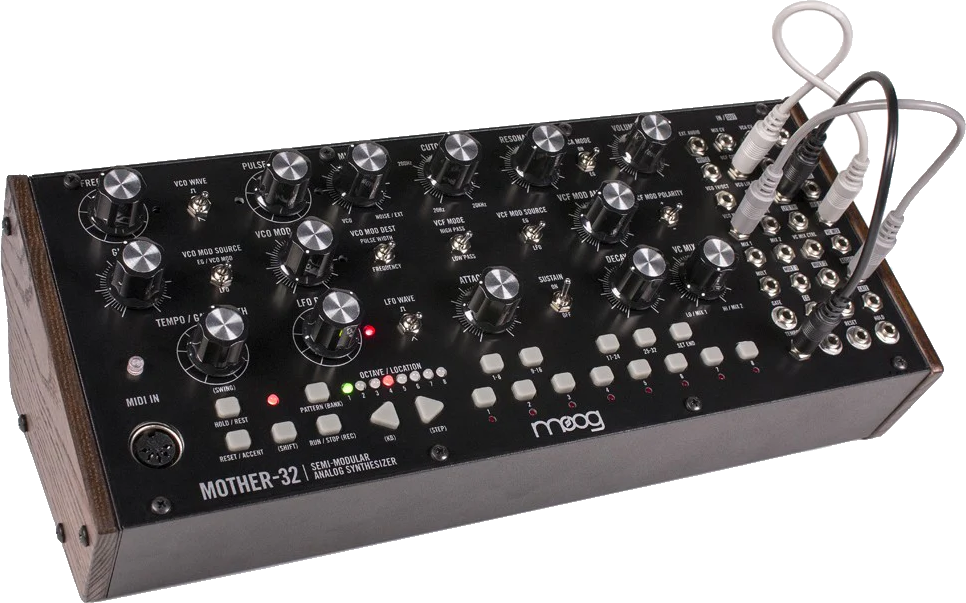
...or CV is the foundation of all synthesis. An oscillator vibrates a loop of a waveform in order to emulate pitch, as it would be heard from a voice or a trumpet or a guitar. That same oscilator can also control parameters of audio effects. This "controlled" voltage produces amplitude. Aplitude can be volume, but it can also be an electrical current. That electrical current can move knobs. The only thing separating CV from a true Oscilator is the accuracy required to operate frequencies within musical ranges. This is why analog synths will specialize in sub & bass OR broad-mids OR super high frequencies - often 3,000 to 30,000 hertz or 3khz to 30khz.
When CV is used to operate FX units, you will see something like a saw wave. That saw wave will have an up or down function. When set to up, the amplitude supplied will increase in power. Down will zap the FX unit and then bleed away to -infinity, or true zero. That current can move the knob without any need to perform the action by hand.
When CV is used to perform a complete journey from -inf to peak and back, and end regardless of how long a note is held, we call this a gated effect. Gates make Envelopes work. When CV repeats while held, this is called a Trigger. Unlike an envelope, triggers will loop but like env, they will reset when a note is pressed. An LFO will has the option to behave similar to or completely independent of the former. Low Frequency Oscilators have the option to sync to a Master Clock (Global BPM) or remain un-anchored. An LFO will not respond to user input. ever. An LFO module may come with an Envelope and Trigger function, but an LFO operates independtly of the two.
Lets take a CV unit. Our first use of routing will be a Micro Controller, not to be confused with a Macro Controller, or Macro. Our micro controller is a single-parameter-knob-twister.
- In a DAW, the CV unit will have a button called "Map". Click map and twist a knob to patch the CV into the desired FX.
- On hardware, your CV module will have an output jack. Run a compatible patch cable(usually an 1/8" cable) into the desired parameter of the hardware unit.
A CV unit may also map to a macro controller. Your macro can be viewed like a tensioning rod. The macro will have a bunch of destinations set to exact minimums and maximums. The CV may then apply voltage like a waterfall, while the macro will designate just enough flow to the correct destinations. DAWs bypass the requirement to perform macro controls effectively via automation, but it is still worth ackowledging CV macros for analog users.
Approach routing with a CV oriented mindset. A sine wave can emit noise, but it can also be a low frequency oscillator. When our sine is an LFO, the current can move knobs up and down. In order to move said knob, it needs to be patched/routed to another parameter. Lets use a bi-pole amplitude modulator for the volume knob, aka Ring Modulation. The signal carrying oscilator - OSC B, will be unplugged from the volume recieving input and get plugged into the RM module. The AM module is plugged into our dedicated sound oscilator, often OSC A, and the AM module will turn the volume up and down at the frequency, or speed of OSC B. While OSC B is occupied with AM, OSC A is still free to produce sound for the speakers.
The routing of this configuration would look like
OSC A => RM Input => Modulated Output => Post Processing => Speaker
OSC B => RM ⇪
The Matrix is both the highest and lowest level of routing. User Interfaces are often redundant once an engineer understands how and why a matrix exists. Please get comfortable with their absence.
A matrix(x-channel, x-parameter) allows a user to perform functions like compression sidechain or LFO to LFO mapping. The engineer simply needs to keep track of where the source and destination signals are. This is also why experienced producers skip naming their channels. A DAW will assign each channel an address or number by default. Naming these channels only improves readability for colaborators or 3rd party mix engineers.
- Sidechain
creates room for drums in our mixdown. It is accomplished using any of the methods below, but each use case is relative.
- Route your targeted output signal into the compressor.
- Set your attack, release, and ratio.
- Decide if your compression sidechain will duck the reciever in full
Compression sidechaining is not an accurate method as it computes incoming signal in real time. No matter how effective your hardware is, there could be a 10ms delay up to 100ms delay in the form of bloom. You may learn more about parameters in compression.
The best use case of compression sidechaining is to duck one instrument using signal from a second instrument. Some examples would be a broadband sidechain with a pluck ducking a pad or sustain, ducking the top of your kick with signal from your snare to increase headroom on a 4/4 pattern, or to make vocals pop in a mix that is overwhelmed by midrange.
- Right click the volume fader of your sidechain group or add a fruity balance/utility to the end of your send FX.
- Match your sidechain shape to your kick drum. Flatten a render of your processed kick to prevent bow-tying in your sub.
- Copy this sidechain shape and paste it anywhere your kick plays or drums and bass are playing at the same time.
Inline automation is the act of scripting your sidechain. Because the daw is reading code instead of reacting to an input, you can get a snappy attack on your sidechain, increasing the pop, or transient, of your drums.
Additionally, you may lead your sidechain in specific parts of your song. By easing your sidechain in before the drum hits, you can get a louder bang with less volume. This is best used on every other snare or before major transitions.
- Set a limiter on your master.
- Boost the signal of your desired sound until the limiter ducks the output of every sound behind it.
Because limiting is brickwall compression, it still has to process incoming signal. If your signal is snappy enough and loud enough, it will force your limiter to duck other sounds to clear headroom for your loudest source. This is best used with transient shaping and on drums.
- Place a ring mod where a utility/fruity balance would go.
- Watch this.
- Toggle sidechain mod on an applicable ring modulator (melda, kiloheartz).
- Create a rectified input signal, or utilize a built in one from within the chosen ring mod.
Ring mod sidechains are as effective as they are stylish. You will get absolute transparency. You will not get a clean pump. If you are new to routing, please study signal routing.
- Harmonic Series
The Harmonic Series is made up of fractions on the fundemental level. As a rule, you may add +1 note for every octave
from 0 up.
Octave 0 (sub) takes up so much amplitude that it only has room for 1 note. This is why sub bass is monophonic in
european derived music. If you do not stick to this guideline, your sub will oscilate as it phases with accompanying
notes.
In octave 1 (bass), it is in your best interest to stick to 5ths (7 semitones apart). E and B, D and A and so on. The circle of 5ths creates something similar to a double helix. An easier way to visualize this is to call back to our +1 rule. Octave 1 now allows for notes to share 1/2 of the space.
Octave 2 (lower mid) now allows for 1/3rd of space without notes clashing. Just like how we had to split our 12 tone scale into 7 steps apart, 1/3rd would allow us to savely use - i will be fact checking this later
For octave 3 (mids), the +1 rule begins to disolve. Notes spaced 1 semitone apart now work in the context of larger chords. You can layer up from the sub/0 octave using the afformentioned tools on real instruments or in orchestrated pieces with no issues. Key takeaways for the 3rd octave are that all prevelant chords often take place here in middle C or around a4/440hz. Your dominants, flats, augmented, relative, dimishinished, minor, major, etc. will sound right
a harmonic series will tell you about overtones, organic treble bleed, where your strongest harmonic lies (if not the fundemental), the peaks and troughs in your (in)audible spectrum, and how best to use any waveform. I will never encourage you to use a saw wave because it sounds like a saw wave, but rather because saws have a built in cutoff and make your mids pop with less effort. Same goes for using a sine wave. If you need more bass, a sine wave will be loudest. A sine wave can also suggest the dominant note of your harmonies. You may place a single note sine behind any chord where you want to suggest a moody E in place of a prominent F# of a B Major. You may also use a sine to shape the timbre of your singer by backing their lead melody.
- Stereo & Width
Wideness is Loudness.
Width is nothing more than a saturation of the stereo field. There are a few methods to achieve stereo
depth and they are often some form of delay, panning, or unison(phase). Best rule of thumb is increase
stereo saturation as we increase in pitch.
Sound Good In Monophonic
A good stereo field will have positive stereo correlation, or mono-compatible. When a sound does not sound good in mono, it will sound bad on phones, quiet in clubs, sicken or harm festival attendees, and generally just sound bad in the car.
is the most basic, but easily the most versatile form of stereo control. You may reduce sounds to mono to take clutter out of a mix without reducing bass/increase the presence of high end without increasing the volume. You can turn the rate off on a phaser and separate each pole/phase individually. You can take 2 unique recordings and pan them into the left and right channel respectively to create true stereo depth. This also applies to analog synths.
creates true stereo seperation via analog or acoustic environments. The randomness of every recording provides a smoother texture to your stereo field and is most commonly practiced with vocal harmonies, string instruments, and
is not exclusive to synthesizers, but is most commonly associated with them. Flangers and chorus create false unison using delay. Synths create true unison by playing multiple instances of an oscillator out of phase, often in stereo. A unison mix may then be used like a volume knob.
Haas effect is any amount of separation of the left and right channel by/up to 20ms. This stereo delay creates an artificial sense of depth which may be desirable for mono-compatibility.
Chorus operates between 20-50ms and affects the pitch and latency of many stereo copies of the input signal.
Flange begins at 50ms and smears the delay along a modulation cycle. Some units offer a gooey positive filter or a metallic negative filter to bias your signal.
is a technology that uses an Impulse Response to create a reverb with no release. Impulse responses are wave files that emulate a snapshot of a room, and the accompanying stereo data. IRs consequently have inconsistent mono compatibility.
Convolution and IRs are required for authentic guitar sounds because distortion doesnt make the guitar. Guitars sound like the speaker a guitar is run through. To emulate common guitar sounds, an sm57 inspired comb filter may be used alongside haas to replicate an XY polarity. This is then paired with classic speakers like the Mesa Boogie 4x12 with their 4 uniquely imperfect Celestion Vintage 30s or a Marshall 1960, which also runs celestion cones. These had stock G12T-75s (12", 75w per speaker) wired in a parallel series.
Will add more later.
- Phase
means many things. As an all-purpose definition, phase is position. Phase is your position in your stereo field, spectral field, and in time. A good phase heavily relies on you to abstain from canceling out other waveforms. Phase Cancelation will occur when any waveforms cross in your mix and invert.
There is a good chance that any sound you're looking for can be summed up as Resonance. Resonance in the bass, resonance on the top end, etc. By biasing your resonant frequencies, you can control a lot of the sound with little effort. This is easiest in squares which are harmonically rich. This can also be done in white noise because it has the same quality of harmonic content, but no specific frequency.
If your oscillator has a static phase, you may set it in any of 360 degrees from its starting position. Good (mirrored) phase will increase or maintain your output while bad (inverted) phase will decrease your output. Phasing occurs on every overlapping wave, but is most noticable in generators playing the same pitch, or frequency.
Stereo phasing, or mono compatibility, is commonly addressed is because a pair of speakers will mute each other when played off axis or with a delay. It is normal for a stereo pair of speakers to play perfectly out of phase and reduce the amplitude of an instrument or master output. To prevent phase cancelation, we use a specific set of mixing techniques. Unison on synths creates a carousel of duplicate waveforms starting at different points in a cycle. For analog, we record multiple unique takes for instruments or vocals, panning them hard left and right. More common techniques are desynced delay (haas effect), reverb, and manual panning.
The main way to prevent stereo phasing in a live setting is by controlling your mono compatibility. If your mix sounds as good in mono as it does in stereo, it will take a lot of effort to ruin your music in a live setting Lastly, a phase is a sine. all waveforms consist of inumerable sines. Equalizers use additive and subtractive phasing to change the spectral response of your signal. This in turn affects phasers, flangers, and other effects ranging from static filter sweeps to a plain bell curve. Once you understand this, audio processing becomes simpler.
Is all about amplitude.
Visualize dimensions. 1D cannot experience planar motion. 2D cannot experience
depth. If stereo phase is the 3rd dimension, positional phase is a 2 dimensional concept.
It plays on dynamic range and transient presence, much like how spectral phase uses each band of the
audible frequency spectrum to round a mix.
Taking two sine waves "centimeters" out of tune with eachother creates low frequency oscilation. This can be used on two sub basses to create a rolling vibration or to replicate the classic guitar bend squeal.
Increasing the resonance of filters (includes flanger, chorus, phaser) allows you to reharmonize or sweep existing harmonic content with more aggressive tonality.
- Dynamic Range
This number is pursued by the absolute bottom rung of producers. Here are the facts.
This measurement tool is used by scientists. This measuring cup is not used by musicians. Rock music does not contain the dang nabit flange because distortion guitar has the annoying orange distorted out. Dubstep lacks the bobby flay because angry dubstep noises are written in legato (long, sustained notes). OLD ASS RECORDINGS have bombastic pains because mixing was a new technology and drums are fucking loud bro. A snare drum is one of the only things in your mix that should have a ridiculous DR value.
measures the average volume of a sound over an number of time. Loudness, as a thing you achieve, is captured by holding a sound at max volume and providing this loud thing stereo saturation, with positive phase correlation. A sound that achieves 100% stereo correlation is a good sound. A transient sound is a good sound, but it is not a loud sound. This is due to how the human ear percieves volume. Loud is not inherently good, but it is also not bad. It is just loud.
Back to loud - sustain, holding a note, will allow a sound at -18db to sound louder than a pluck with a 30ms peak of -2db that decays to -36db over 150ms. The latter is a transient sound. It exists briefly and then disappears. Transients and sustains do best when they coexist. Loud loses its excitement without quiet and vice versa.
is a necessary part of achieving professional masters. Keeping the input signal reasonably quiet can combat distortion. When a compressor/clipper recieves input signal that surpasses threshold (below or at ±0db), the compressor will deny transient information by walling it off or distorting the output signal respectively.
Compressors distort audio too, but the wave-shaping will take on the form of your input signal. This is why it is important to transparently distort instruments early on, compress your master like a series of rivers (or channels), and tie them up at the master.
- Compression & Gate
is the act of normalizing a sound. Your noise floor/ceiling are set by the user or compressor. After your dynamic range is set, your signal is averaged using multiples. 10x would lead to very flat, quiet sound. 2x would lead to a dynamic, but volatile waveform.
It is best to use only as much compression as needed in one stage and then process the sound further. Use saturation or a limiter to increase output volume after the desired amount of compresison is reached. Multiple compressors in parallel will rarely benefit the end user unless the goal is to set multiple back to back and create an infinite decay or an overly noisy sound.
is the amount of time a compressor needs to respond to input signal. A short attack creates immediate compression, but may be prone to pops and clicks. A long attack will be less aggressive, but requires more stable input for the effects of the compression to be audible.
So why is there an attack setting if a compressor is just supposed to work? Compressors used to use tiny lightbulbs known as diodes. The input signal would create voltage. Analog compressors would respond to this using a light absorbing diode. This phenomenon is also referred to as Bloom. That photoreceptor on the roof of the hardware compression module allowed the compressor to understand if it is time to turn on, and how quickly.
like attack, release functions on an envelope. Release says how long the compression decays and what intensity the compressor left off at when it hears audio again.
Return to bloom. Our diode has stored voltage from the last time it had signal. The signal just shut off because there is no audio to provide current. The release knob determines how long that light will bleed its stored current. A long dimmer can keep the compression driven for longer periods, going from full light to partial light, to no light. A short dimmer will instead communicate to the compressor that we let the attack respond from pitch black to full, keeping transients snappy and, well, transient.
is the factor in which a compressor averages an audio signal when bloom has peaked. Ratio is read left to right as INPUT SIGNAL:ATTENUATED OUTPUT. High quality compressors may begin at 1:1.1, or 1÷1.1 instances of input signal. as we reach 1:2, or 1÷2 instances of input signal, your quiet sounds will be 2x louder than before while your loudest sound will be half as loud, relative to the minimum and maximum volume of your input signal.
is an ON switch for a 2 stage unit. Any input above the threshold volume will be reduced however many times your ratio is set to, but now with an extra slant in the form of a Knee. Knee compression specifically mediates louder signal. Any volume below the threshold will follow the primary Ratio. Volume affected by threshold will sit between the threshold, knee, and cieling.
As input signal passes the threshold, it has nowhere left to travel but the cieling. Signal will be reduced using a linear or a logarithmic curve. Input signal below threshold will smooth out and then taper off as it reaches the cieling. For linear curves, imagine that the threshold is the rendevouz for the intended dynamic range, while the knee determines how much the dynamic range gets averaged.
The loudest input volume specified by the compressor. If this knob is turned from 0db, a sounds maximum potential output volume will be reduced, and its dynamic range with it.
will determine the min/max operating volumes of a compressor in decibles. Range also works to turn it on and off below a designated volume. -inf to 0 turns range OFF. This is because range has to specify an ON volume and an OFF volume to perform its only task.
Provided this is a feature of your compressor, expansion will focus on boosting your signal up-to and past your threshold. Expansion is best known for creating painful noise via OTT. This function is best paired with a pre-EQ so the expansion part doesnt go oo piece of candy and blast every sound from 5hz to 48,000hz with malicious intent.
Downward is the intended function of a compressor, as explained in previous parts. It is not typically a "feature" of compressors as downward compression is, by definition, the function of compressing a thing.
is a function of Range, and also a function of a Gate. In compression, the floor is sound that will neither activate the compressor, nor get picked up by the compressor when active. In a gate, the floor is the lowest percievable volume. A gate will not remove volume below the floor, but the gate will shut off the output the instant a source has sustained volume below the noise floor for however long our release is.
Looks ahead of your input signal. It will compensate for the bloom affect of your compression. By allowing the compressor to see what signal is coming before it arrives, you can reduce inconsistencies through averaging. Lookahead works both with and against attack depending on your usage.
- For:
When using a gate to passively cut noise out of a guitar recording, lookahead can assist with the choppy output of player who was too stoned to perform anything usable, but insists they need to smoke to play their part. Its also great for smoothing out a recording of a singer with pretty privelege (the dynamic control of a toddler). - Against:
Any scenario where routing is necessary. Sidechain with lookahead is redundant. Sidechain exists to cut the instrumental out immediately, allowing the transients to pop through.
A solid case use would be [eq>comp>vocoder>delay>comp>eq>saturator]. The reason for this is vocoders tend to make sounds much darker than before and also make your signal quieter if not inaudible. Compressing again average out your high end and low end and make the audible spectrum balanced once more while retaining your mids, depending on how aggressive your compression ratio is.
- Distortion
Distortion is what happens when a waveform is altered to create something that doesnt exist. All distortion is saturation, and all saturation distorts. The catch - Not all distortion will make a sound louder. Saturation specifically comes from pushing harmonic content past its peak, a.k.a. clipping. This functions much closer to fader gain/output gain than it does distortion. While distortion will always happen after signal passes 0db, saturation will catch peaked harmonics on the way up and turn clipped signal into something more musical. Common methods of distortion are overdrive, downsampling, clipping, and waveshaping.
in treble, distortion creates pink to white noise depending on the intensity of the high end. In bass, it will create humming and eventually the classic squared out sound. When you combine sub distortion with high end, it will make humming. With mids, it creates gargling and cracking. You can bias the sub distortion to emulate the warmth of a speaker cone that is being vibrated to shreds.
Distortion is the product of pushing signal gain into a waveshaping unit. Waveshaping is a product of Phase. If your wave spans from a top corner to an opposing bottom corner, it will eventually "square-out" your input signal and in essence, compress your signal. The output signal will have more peak amplitude over time, creating a louder output. When used sparingly, this is called saturation.
is a term that is poorly defined. The act of clipping itself is not up to interpretation. In the context of live audio, clipping is objectively bad. Analog clipping rips speaker coness and overloads hardware, which causes heat damage.
In digital audio, clipping commonly happens before a sound reaches your master limiter. You can prevent this in the mixer by turning the output of your channels down, limiting in groups, and mixing quiet. As you reach for louder volumes, you will have to get more creative. Understand that if the master out doesn't clip, your DAW doesn't clip, and your master.wav does not clip.
If you limit your project, the clipping converts to distortion.
The confusion then comes from a misunderstanding of distortion. Your signal can go red for a number of reasons. If you didn't mean to go red and it sounds bad, the distortion is bad. No argument there. If the signal has gone red and it sounds good, keep it or figure out ways to recreate it intentionally with waveshaping and bias with EQ
this is too complex of a topic for me rn. check back later. thank you.
No amount of dynamic range can make your music compete with noisia or svdden death. You have to come to the playing field prepared to make sacrifices, whether sidechaining your non-percussion elements into other basses, manually comb filtering your basses to make room for layered basses, or simply brick-walling groups with a saturator, then a limiter. If you prefer your mixdown to have cozier transients (dynamic range), remove some compression and distortion. It will change the sound of your mix, taking you as far away from an aggressive sound as one can get.
Need dynamic range? Turn everything down and push the output on your limiter. Headroom may be lost when gainstaging is this aggressive, but its not a real issue since audio codecs do not actually "turn down" your audio. It is simply compressed/normalized to the loudest average. If you listen to songs on soundcloud and again on youtube, loud music is loud because the master is loud.
- Noise
consists of your noise floor and noise ceiling. The noise floor is often below -60db on analog devices, but may reach -140db on digital devices. Your absolute noise ceiling will always be ±0db. This is important to know for analog devices when recording. If a microphone does not recieve adaquate input gain, the noise floor's hum/hiss will be as loud as the instrument or vocalist. When this happens, the noise is too loud to mix out of a recording.
is a concept that applies to all generative sources. The noise floor is the lowest volume a signal can go before artifact
noise is introduced. This often occurs with recording interfaces, but can be introduced by a microphone or a synth. The
noise floor is variable and can consist of/include feedback from electrical interference, mechanical/digital artifacts,
but is always recognized as an unintentional source of noise.
View Compression for information on the noise floor of gates, compressors, limiters, etc.
Similar to threshold, noise cieling is the absolute max volume analog devices can record at.[...]
- Dithering
external explanation this site is not affiliated. the explanation is solid.
Dithering is a solution to computer error type noise.
- POW-1 is for loud.
- POW-2 is for quiet.
- POW-3 is for dynamic.
- Triangle is a mallet.
- Square is a hammer.
- non-dithered is a bad option that should be reserved for re-rendered lossless audio 😊
- Sample Rate & Bit Depth
A FINAL render should come in 3 levels. A .wav, an .mp3, and your choice of .flac or .aiff.
- MP3:
this one is whatever. 320kbps, 16 bit audio. MP3 cannot support a higher output and any attempts at conversions and upscaling are a syntactical anomaly.
Tag your files. - FLAC/AIFF:
Read below for further explanation - 16bit/48khz is the sweet-spot. CD only supports up-to 48khz. FLAC users seek lossless audio at a reduced file size.
Tag your files. - WAV:
Read below for further explanation - 24bit/192khz is the highest quality an audio engineer should force on collaborators. 24bit/92khz is optimal, and the highest bit/rate the majority of streaming platforms will accept. Anything over doubles will require immensely powerful hardware to render. Anything over 24 bits cannot be dithered, which means playback devices will raw dog all rendering artifacts. Most consumer speakers are not adaquate for reproducing lossless audio and most listeners do not know if they are even listening in 41khz, 48khz, doubles, or quads or how to enable hardware rendering of Hi-Fi audio. DO NOT release a 32 bit copy into the wild; It can bite you in the ass in the event of a copyright dispute.
- A few readers may need to hear this so i'll say it
here.
Allowing an algorithm to downsample your audio is disgraceful. Park your high horse and read the documentation on each platform before introducing avoidable artifacts into your masters.
This one determines how often audio refreshes. The average listener can distinguish between sample rates because there is no change in pitch or amplitude that occurs. Only the clarity, or the speed that audio is refreshed. Remember back to those long flourescent bulbs in government facilities. Look at the wrong part of a room and you can see the walls flicker. When the ones in the bathrooms are dying out, you can almost see the paper towel dancing in slow motion as you pull it off the dispenser. That is the difference between speed(rate) and distance(depth).
Amplifiers/Speakers cannot operate in sample rates. They are no different from a faucet, and if a speaker is a faucet, that means the audio file is a pump. There is no rate dependent restrictions for analog hardware beside heat disipation and excursion(travel distance between the maximum position and minimum position of a speaker under load).
As an audio engineer and a performer, higher sample rates come with unique advantages. Warping and pitch degredation are greatly reduced when lowering the speed or altering the pitch of an HSR file. More of the original file's characteristics can be reproduced accurately and in real time when reducing the tempo of an HSR file in a DJ set. Sample rate manipulation is another feature of synthesis and wave manipulation known as a buffer overload, down-sampling, and bit crushing. I have not spent much time on this concept and I may come back to it later. For now, view these as methods of distortion.
This one determines the absolute quietest and loudest a sound can be. 16 bit audio can provide 65,536 stages or 96db of headroom. 24 bits offers 16,777,216 stages or 144db. 32 bits is a blasphemous creation that only a mathmetician would care to quantify. After 16 bits, bit depth is no longer a musical part of audio playback. Any promised dynamic range has been compressed out of the wave file by you, your fx, your microphone, and even the air in your room. Welcome to the Hi-Fi grift where nobody is over your head because nobody understand what they're selling you!
So if a violin has a dynamic range of 17 decibels and percussion ranges from 90 to 130, 16 bits would be the beginning of the end. Why then can we render in 24/32?
These higher bit depths are actually scientific tools, and are not inherently meant for "rendering", as a mix engineer would put it. Since a drum kit can only achieve 110db at its apex, a studio does not utilize all 192 decibels of dynamic range provided by a 32 bit float recording. A researcher though? Take that field recorder out in quads mode and see what you can capture from a bird or an insect. Bring that heightened range under the lens of a high quality limiter and use that high sample rate to slow down or reduce the octave of the recording. That 32 bits and 192khz sample rate can now capture sounds at pitches and volumes the humman ear may never percieve. High bit depths are there so you can recieve audio. High depth renders are there to retain the qualities of a scientific or archival recording. AS such, the quality of the samples in a 32 bit wave are referenced in court when determining who the original author is, but they are not listening to how "dynamic" and "life-like" the 32 bit recording is.
Always record in WAV. Always record at 24bits or higher. A 16 bit waveform can clip. a 24 bit waveform can theoretically clip, but it is unlikely. a 32 bit waveform clipping is a display of sheer stupidity. The sum of all 24 bit recordings will produce a unique 32 bit file for the Master Recording. It cannot be done without great effort. I only reccomend 32 to those who can afford an in-home data server. Neither musicians nor studio engineers will utilize 192db of range in musical applications, but it is the standard for a reason.
- Miscelaneous
Dithering Explained